

Available for Resolve, Final Cut Pro, Premiere Pro, After Effects & Motion
Hawaiki AutoSplit
Split screen creation and animation.
Hawaiki AutoSplit is a versatile plug-in for split screen creation and animation, with the power and flexibility to help you work faster and more creatively, in DaVinci Resolve, Premiere Pro, After Effects, Final Cut Pro and Motion.
With simple menu-driven animation and fully customisable grid parameters, AutoSplit harnesses a wealth of automated processes to make split screen projects easier and more enjoyable than ever.

Features
Classic
An almost limitless number of rectangular grids in the classic split screen formation.
Extended
Shapes based on triangles that combine into many unusual and effective layouts.
Any box you like
Set the scale, crop and hold position of each “box” to any value: virtually no limit to the grids you can build, plus a library of built-in presets to start from.
Animation
Menu-driven Arrive and Depart animation, Pan & Scan and motion blur.
Borders
Impressive border styling and rounded corners.
Metal
AutoSplit 1.5 versions of Classic and Extended use a new image processing pipeline with Metal GPU acceleration.
How does it work?
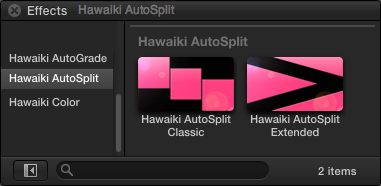
The plug-in comes with two effect modules: Classic for rectangular grids and Extended for layouts built from triangles.
Unlike other split screen plug-ins, which offer a limited set of fixed “boxes”, AutoSplit lets you set the scale, crop and hold position of your box to any value. With a rich feature set including impressive border styling, AutoSplit is the quickest and most powerful split screen plug-in on the market.
See the manual for the details.
System Requirements
| macOS | macOS 14.7 Sonoma or later, macOS 15 Sequoia, macOS 26 Tahoe |
|---|---|
| FxFactory | 8.0.27 or later |
| Applications | DaVinci Resolve 20 or later, Final Cut Pro 10.6 or later, Motion 5.6 or later, Premiere Pro 22 or later, After Effects 22 or later |

Purchase and installation
Hawaiki AutoSplit is available through FxFactory. Download FxFactory, install the free trial, and buy when you’re ready: the trial unlocks in place.